

Countless hours spent recounting stock, reconciling spreadsheets and reacting to inventory issues after they’ve already become expensive problems—at some point, every growing retailer hits that wall. Manual inventory management wasn’t built for today’s scale or speed.
Fortunately, there’s a better way.
Automated inventory management gives retailers real-time visibility, accurate stock control and the operational efficiency they need to grow with confidence. For multi-location businesses, omni-channel sellers or retailers expanding into new markets, automation becomes the backbone of operational resilience.
In this guide, we’ll cover:
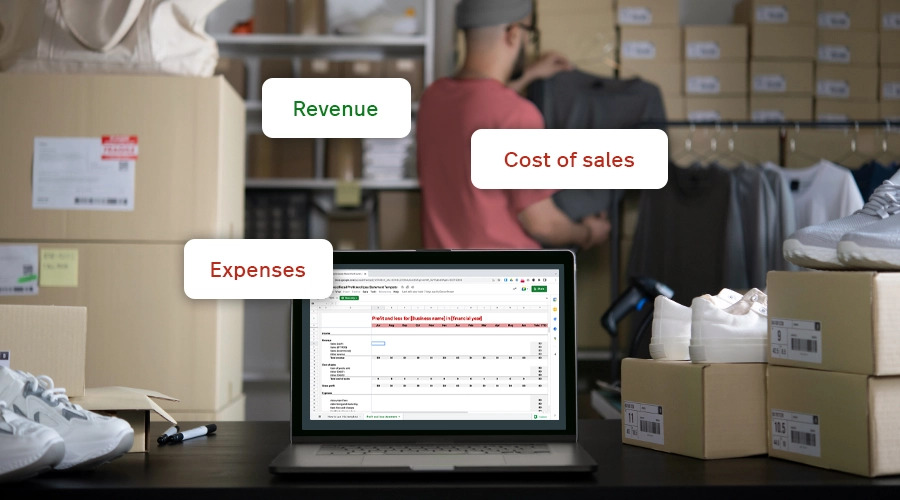
Profit and Loss Template
Examine the financial health of your business by highlighting exactly how much revenue is being generated versus what’s being spent.
What is automated inventory management?
Automated inventory management is the use of software and connected technologies to track, manage and optimize stock levels in real time across all locations and sales channels. Rather than relying on manual counts or static spreadsheets, automated systems continuously update inventory data so retailers can make faster, more informed decisions.
For established or fast-growing retailers, automated inventory management helps to:
- increase operational efficiency
- sync inventory across all sales channels
- prevent stockouts and overstock
- reduce manual errors
- improve demand forecasting
- support scalable growth
In practice, automation turns inventory from a manual, error-prone process into a strategic advantage—helping retailers optimize ordering, reduce waste and protect margins.
Automated inventory management is commonly used by multi-location and omni-channel retailers to maintain accurate stock levels as they scale.
How do automated systems actually work?
Automated inventory management relies on a combination of interconnected technologies working together in real time, creating a single source of truth across your retail ecosystem.
Point of sale and inventory management software
Within an automated inventory management system, your retail point of sale acts as the brain, recording each sale, return and new stock order, and automatically updating inventory counts in real-time.
In other words, it syncs everything together—your online store, your marketplace listings, your warehouse, your retail floors. Every POS system should be able to:
- update stock counts in real time everywhere you sell
- handle complex product structures (variants, bundles, serialized items)
- alert teams to low stock and trigger/suggest reorders
- break down inventory performance at a glance
More robust systems can also forecast demand based on historical data and seasonal trends, so retailers can optimize inventory and reduce holding costs.
Lightspeed does this across POS, advanced analytics and insights, and direct integrations with suppliers—so instead of patching systems together, everything connects seamlessly.
Scanners and tags
Barcode scanners and radio frequency identification (RFID) tags track items as they move in and out of your warehouse and store locations. It’s like GPS for your inventory. Every time an item is scanned—received, shelved, transferred, sold—the system updates inventory instantly.
Here’s how it works:
- Receiving: products are scanned into the warehouse with quantities, SKUs and locations
- Storage: items are scanned again when shelved, so you know exactly where to find them
- Transfers: warehouses and stores maintain synchronized counts during stock movements
- Sales: items are deducted instantly at the point of sale
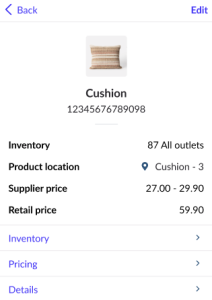
Product location information as seen with Lightspeed Scanner
For retailers with large catalogs or high-value items, RFID takes this to another level—enabling full cycle counts in minutes instead of hours (or days). Unlike barcodes, which require line-of-sight and must be scanned one at a time, RFID tags can be read in bulk from several feet away. A handheld RFID reader can sweep a stockroom and instantly capture hundreds of items per second, even if they’re inside boxes, behind other products or stacked tightly on shelves.
Internet of things (IoT) devices
For retailers with large warehouses or fast-moving inventory, IoT tools—such as smart shelves, smart bins and weight-sensing containers, autonomous mobile robots (AMRs), and RFID gates or portals—can be used to automatically detect when stock is removed, triggering updates or reorder alerts.
These systems:
- continuously assess shelf quantity
- sync depletion in real time
- submit predefined reorder requests
- eliminate (or almost eliminate) human intervention entirely
For example, with smart shelves, sensors continuously monitor stock levels as products are removed. From there, the shelves send automatic updates to the inventory management system. When inventory drops below a set threshold, smart shelves can trigger low-stock alerts or even reorder requests, ensuring that stock levels are consistently maintained.
This level of automation is particularly powerful for omni-channel sellers where online orders can deplete store inventory without staff noticing.
Types of automated inventory management
Automated inventory systems aren’t one-size-fits-all. Depending on your scale, infrastructure and resources, you may opt for a fully automated solution or a semi-automated setup that blends automation with human oversight.
Fully automated inventory management
Fully automated systems use technology to handle nearly every aspect of inventory control, including:
- real-time tracking using scanners, RFID or IoT
- automated purchase orders triggered by predefined minimum thresholds or predictive demand models
- multi-location and omni-channel synchronization
- deep integration with POS, accounting, ecommerce and supplier systems
- automated forecasting and replenishment algorithms
These solutions offer unparalleled accuracy and scalability, but typically require a (much) larger upfront investment and require ongoing technical support. They can also be opaque, operating like a black box, wherein the logic behind decisions—why the system made a certain choice—aren’t always visible or intuitive to the retailer.
Fully automated systems also cannot react quickly to sudden market changes without human intervention, so if consumer demand shifts suddenly, fully automated systems may continue to behave as if everything is normal, potentially creating misalignment.
Semi-automated inventory management
Semi-automated inventory management systems blend automated tracking with some manual processes. This approach often involves using software to track inventory levels and generate reports, while tasks like stocktaking and ordering may still involve some manual effort—though typically greatly reduced when compared to manually managing inventory.
Semi-automated inventory management typically costs much less than a fully automated system, and can be less time intensive to set up. A semi-automated inventory flow could look like this:
- A retailer goes to make a new purchase order to restock their store. Their POS system, having tracked sales data, makes recommendations on what products should be ordered and in what quantity.
- The product arrives at a warehouse. It is scanned by an employee, automatically updating the inventory management system with the new stock level.
- When the product arrives at a store, it is scanned, automatically updating the POS data—it is removed from the warehouse inventory and added to the store’s stock.
- When the product sells, data on how fast it sold, remaining stock level and other information like COGS is recorded in the POS to refine recommendations.
Why automated inventory management is important
Automated inventory management isn’t just about efficiency—it’s about protecting revenue, enabling growth and creating a retail operation that can withstand rapid change.
Here’s why.
Because manual systems just can’t keep up anymore
Manual inventory management is time-consuming and prone to human error, which can lead to stockouts, overstock, inaccurate financials, lower margins, frustrated customers and ultimately lost revenue.
Automation streamlines the entire process—from tracking stock levels to reordering products—and leaves you with clean, reliable data.Tools like barcode scanners, RFID tags and IoT sensors provide real-time data, cutting down on tedious manual counts and reducing the risk of inaccuracies. This ensures you always have an accurate picture of your inventory, so you can respond quickly to shifting consumer demand and market conditions.
Because it saves time—and hard costs
Automation can lead to significant cost savings by both reducing labor hours spent on stock counts, investigations and manual reconciliation, and minimizing losses from overstocking or stockouts, both of which impact your bottom line.
It’s estimated that the global retail industry hemorrhages $1.73 trillion annually due to the cost of stockouts and overstock. Automated systems help you plug that leak.
A system with powerful analytics like Lightspeed tracks your sales data and automatically identifies top-selling and slow-moving items, empowering you to make data-backed decisions about purchasing, pricing and promotions. It can even help you take the guesswork out of demand forecasting for both evergreen and seasonal inventory.
Because you can’t scale with spreadsheets
As your business grows, managing inventory manually becomes increasingly—and then impossibly—complex. Adding new product lines, new locations or new channels also adds new complexities that manual systems simply can’t handle at scale.
Automated systems provide the infrastructure you need to scale your operations efficiently, ensuring:
- reliable multi-location visibility
- real-time stock updates and accuracy
- streamlined replenishment
- unified omni-channel data
Whether you’re expanding into new channels, markets, or simply processing a lot more volume, automated systems help you ensure that inventory management remains a strength, not a bottleneck, as your business evolves.
Benefits of automated inventory management
Automated inventory management doesn’t just simplify your day-to-day—it directly impacts revenue, margins and customer experience. When your system tracks stock levels in real time, you always know exactly what’s available across every channel and location. That visibility alone reduces friction, eliminates guesswork and empowers you to plan your assortment proactively and strategically.
Automation also dramatically reduces human error. Fewer manual inputs mean fewer discrepancies to chase down, fewer hours lost to recounts and far less risk of stockouts or overstocking. Most importantly, customers feel the impact. When items are consistently in stock, and associates are on the floor—not the stockroom—customer engagement and satisfaction increases.
Here are just some of the core benefits of switching from manual to an automated inventory system:
Better customer experience
Automated inventory management systems help you make sure you have the right amount of stock at the right time. By tracking sales and analyzing historical data, these systems can recommend what and how much you should order, automate low-stock alerts or purchase orders, or even automatically reorder products when stock levels dip below predefined thresholds.
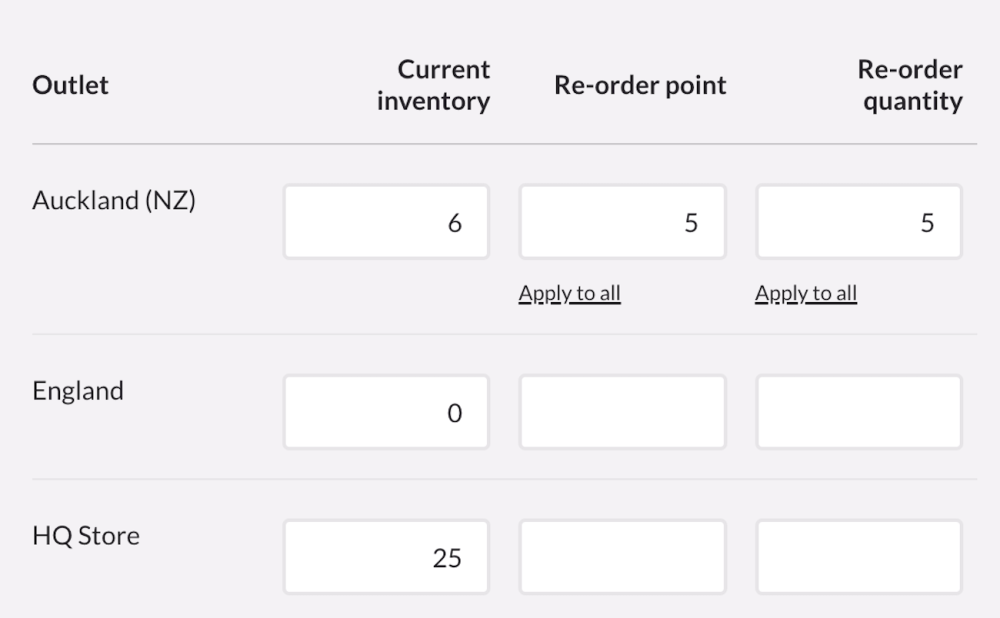
Reorder points in Lightspeed Retail
This helps retailers prevent both overordering, which ties up capital, and stockouts, which cost you sales and send frustrated customers to your competitors.
With the rise of agentic commerce—where shoppers rely on AI-driven buying assistants—product availability will become even more critical. Because if a product isn’t in stock in your store, the agent simply recommends another retailer. Inventory management automation helps ensure your business stays on the agent’s shortlist.
Fewer errors and better decision-making
Automated inventory systems track stock levels in real time, eliminating much of the manual counting and data entry that create inconsistencies.
For example, imagine you’re a luxury footwear retailer processing hundreds of online and in-store orders per hour during the holiday rush. In a manual system, human error can creep in at every touchpoint:
- a hurried employee miscounts stock during receiving
- an associate forgets to update the system after a transfer between stores
- online orders continue for a sold-out style because ecommerce and in-store inventory aren’t synced
Individually, these moments seem small—but they compound quickly, leading to stockouts of your top-sellers, overordering or excess inventory sitting in the wrong location.
With automated management, those risks all but disappear. RFID tags or scanners track each product as it moves across your business, updating stock levels automatically as items move. When a popular style starts running low in one store, your system flags it and recommends a transfer from another location with surplus stock—preventing both a stockout and an unnecessary reorder. At the same time, forecasting models adjust future buys based on real-time sell-through, keeping replenishment aligned with actual demand.
This level of accuracy and coordination simply isn’t possible with manual workflows—and it’s exactly why automation becomes a strategic advantage for retailers operating at scale.
Time and labor savings
Industry reports estimate that retail associates in non-automated environments spend up to 30-40% of their time on manual inventory tasks, from counting to reconciling to fixing preventable mistakes.
Not engaging customers.
Not driving sales.
Not merchandising or creating experiences that bring people back.
Given that labor costs typically represent 15–30% of your total revenue, time spent on manual inventory management carries a real financial impact. Automation gives that time back—so your team can focus on higher-value work that improves efficiency, boosts sales and strengthens customer relationships.
In a recent survey of more than 300 US shoppers, 70% cited personalized service as a key factor in loyalty. When automation removes low-value inventory work from your team’s day, it creates space for the kind of personalized, high-touch experiences that actually keep customers coming back.
Best practices for automated inventory management
Automation does a lot of the heavy lifting, but it’s not completely hands-off. Following a few best practices ensures your inventory system stays accurate, scalable and aligned with how your business actually operates.
Choose the right system
There are many automated systems to choose from, so how do you pick the right one for your business? Start by taking inventory—pun intended—of the capabilities that your business needs today and where you expect it to go in the future.
Here are the key features to look for in an automated inventory management system—and why they matter:
- Centralized, multi-location visibility: Retailers operating across multiple stores or warehouses need a single source of truth. Centralized visibility allows you to monitor stock levels across all locations in real time and move products where they’re needed most, reducing the risk of stockouts and excess inventory.
- Real-time inventory updates across all sales channels: Real-time inventory syncing lets you know exactly what you have right now across your POS, online store and marketplaces. When an item sells in one channel, availability reflects everywhere. Unified platforms like Lightspeed Retail keep inventory, sales and ecommerce data continuously aligned.
- Advanced demand forecasting: Modern inventory management software uses historical sales, trends, and seasonality to forecast demand more accurately. Advanced forecasting supports smarter purchasing decisions, improves replenishment timing and helps retailers plan assortments that match customer demand.
- Rules-based inventory automation: Rules-based automation allows retailers to define stock thresholds and replenishment logic in advance. When inventory falls below a set level, the system can trigger alerts, recommend purchase orders, or initiate transfers—reducing manual oversight and keeping fast-moving products in stock.
- Supplier integrations and streamlined purchasing: Integrated supplier workflows reduce manual data entry and speed up purchasing. With tools like Lightspeed NuORDER, retailers can access digital catalogs, pricing and synced product data, place orders faster and maintain cleaner inventory data.
- Support for complex product structures: An effective inventory system should handle variants, bundles, kits and composite products without compromising accuracy. This is essential for retailers with large catalogs or products that share components.
- Inventory reporting and performance insights: Robust reporting helps retailers understand what’s selling, what’s stagnating and where margin is at risk. Look for analytics and insights into revenue, profit, COGS, sell-through rates and aging or dusty inventory.
- Scalable architecture: As your business grows, your inventory system should scale with it. Cloud-based platforms make it easier to add locations, sales channels and third-party tools without rebuilding workflows.
- Role-based permissions and access controls: Role-based permissions ensure the right people have the right level of access, reducing errors and maintaining accountability across larger teams and multiple locations.
Maintain data integrity
Automated inventory systems are only as good as the data feeding it. To make sure the data you put into the system is correct and up-to-date, you’ll still want to periodically audit your inventory to confirm the numbers line up and optimize system performance.
While your automated system will handle most of the heavy lifting, periodic reviews are essential to maintain a clean data foundation. Conduct a physical inventory count at least once a year—use scanners or RFID tags to reduce or eliminate the risk of human entry error. This will allow you to identify any discrepancies between the system data and the actual physical inventory, so you can investigate and correct any inaccuracies.
Use real-time data for smarter planning
Real-time data doesn’t just give you visibility—it enables you to spot trends early, accurately anticipate demand and, if necessary, course correct long before profits, sales or customer experience take a hit.
This becomes especially powerful for multi-location or omni-channel retailers, where buying patterns vary widely across regions, channels and customer segments. With an automated system analyzing these patterns in real time, you can adjust your purchasing strategy, refine buy plans and rebalance stock between locations with far greater accuracy. The result is lower carrying costs, fewer stockouts and inventory that’s better aligned with actual demand.
With real-time data and insights at the center of your operations, what once required hours of manual analysis becomes automated and continuous—allowing your team to stay ahead of demand instead of chasing it.
Set your team up for success
Even the best inventory system only works if your team knows how to use it. Take the time to explain how automation will actually improve your team’s day-to-day, from reducing errors to saving them time so they can focus on tasks that are more impactful—and more rewarding.
Hands-on training should cover everyday tasks like receiving, store-to-store transfers, cycle counts and basic troubleshooting so the system becomes second nature.
High-performing teams:
- understand the purpose behind automation, how it improves accuracy, efficiency and the customer experience
- follow standardized processes for receiving, transfers and cycle counts across all locations
- use the system confidently in their day-to-day tasks, including basic troubleshooting
- rely on reporting tools to spot low stock, track sell-through and plan replenishment
- provide feedback to help refine workflows and surface operational gaps early
Keep the feedback loop open. The people working closest to your inventory notice issues first, and their insights can make your automation strategy stronger over time. When your team and your technology work in sync, accuracy improves, scalability becomes easier and your investment delivers its full value.
Emerging trends in automated inventory management
Automating inventory management has already transformed modern retail, but the next wave of innovation promises to push accuracy, efficiency and strategic insight even further. Emerging technologies like generative AI and blockchain are reshaping what’s possible—helping retailers stay nimble in an increasingly complex, omni-channel world.
AI-driven forecasting and decision intelligence
Artificial intelligence (AI) and machine learning are moving beyond basic automation into predictive and prescriptive decision-making. AI can analyze massive datasets—including historical sales, seasonality patterns, external factors like weather or economic shifts, and even social trends—to forecast demand with much higher precision than traditional models. Soon, we’ll see even more advanced applications of generative AI for inventory workflows, such as automated scenario planning and natural-language querying, making actionable insights accessible to non-technical teams.
Integrated cloud-based platforms for shared data and collaboration
Future inventory systems will live in the cloud, breaking down silos between sales channels, suppliers, logistics partners and fulfillment centers. Cloud-native solutions enable real-time collaboration across the entire supply chain, supporting everything from shared data and forecasting to automated product sync and replenishment.
Solutions like Lightspeed NuORDER extend inventory management beyond internal systems by connecting retailers directly to suppliers, making it easier not only to access up-to-date product data and place orders, but also leverage supplier data and relationships to create a winning assortment. In today’s volatile market—where one risky pre-book order could put the long-term health of your business at risk—cloud-based, collaborative platforms will become a key differentiator, fundamentally changing how retailers plan and purchase inventory.
Autonomous inventory checks with drones and robotics
Warehouses and large retail spaces have already started to adopt autonomous systems to automate inventory management tasks like inventory checks that once took hours or days. Drones and robotic vehicles equipped with cameras, RFID readers and sensors can scan shelves, racks and pallets without human intervention—drastically speeding up cycle counts and reducing labor costs. Digital twin technology—virtual replicas of physical warehouses fed by real-time data—will further enhance these capabilities, allowing teams to simulate inventory scenarios, optimize workflows and test layout changes without disrupting operations.
Blockchain for supply chain transparency
Blockchain—a decentralized, tamper-proof ledger—offers a new way to record and verify inventory movements across the supply chain. Every transaction, transfer and change of custody can be logged in an unalterable record, making it easier to track origins, prevent fraud and resolve disputes without manual reconciliation. Smart contracts—self-executing agreements on blockchain—can also automate payments or order releases once pre-defined conditions are met, further streamlining procurement and reducing administrative overhead.
Ready to speed up inventory management with automation?
Automated inventory management isn’t just about saving time—it’s about building a retail operation that can scale, adapt and stay profitable in a rapidly changing market. With real-time visibility, smarter forecasting and connected purchasing workflows, inventory automation gives you the control and confidence to make better decisions across your entire business.
Lightspeed brings everything together in one platform—combining POS, automated inventory management, advanced reporting and supplier integrations like NuORDER—to help you stay in stock, reduce risk and grow without friction. If you’re ready to move beyond spreadsheets and manual workarounds, see how Lightspeed can help you take control of inventory and scale with confidence.
Watch a demo or talk to a POS expert today.